1st place winners of NYC Hackathon 2026!
An iPhone-first Expo app prototype for discovering local NYC clothing purchases through personal ranked shelves. Think Beli, but for clothes people buy nearby.
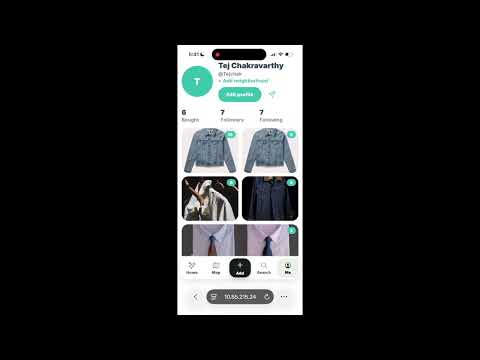
- Beli-style setup for shopping: save things you want, log things you bought, and keep both in one social discovery loop.
- Log a purchase with photo, item name, store/link, price, and notes.
- Want-to-buy list for specific items or shops, similar to a shopping version of Beli's want-to-go list.
- Convert wants into purchases when you buy them, then rank them immediately.
- Binary comparison ranking after save: the app asks simple “was this better than X?” questions and inserts the item into the ranked shelf in
O(log n)comparisons. - Beli-style score from rank position; users do not manually enter a 0–10 score.
- Feed with friend activity such as “Sarah ranked a cropped trench coat #2.”
- Profile shelves with a top-10 ranked shelf, lifetime “worth it” list, and want-to-buy list.
- Search across your purchases, wants, friend activity, and local clothing stores, with dropdown filters for store type (vintage/thrift/boutique/consignment), cost, and minimum rating.
- Nearby map with a real, zoomable Leaflet map of the 5 boroughs, seeded NYC clothing stores with ratings that populate as you pan/zoom, distance sorting, optional location permission, and a shop detail page with directions, Want/Log actions, and a feed of what's been bought there.
- Supabase persistence with per-user row-level security and local offline fallback.
- Expo + React Native + TypeScript
- React Native Web for the browser demo
- Supabase for cloud persistence and AsyncStorage for offline fallback
- Expo Image Picker and Location for native/device capabilities
pnpm install
pnpm web- Create a Supabase project and enable Anonymous Sign-Ins under Authentication → Providers.
- Run
supabase/schema.sqlin the Supabase SQL editor. - Copy
.env.exampleto.envand add the project URL and anon key from Project Settings → API. - Restart Expo after changing environment variables.
The anon key is intended for client apps. Row-level security ensures each anonymous or signed-in user can only access their own saved app state. Without environment variables, the app continues to work using AsyncStorage only.
The web demo opens through Expo. For iPhone, install Expo Go, then run:
pnpm startScan the QR code with the Expo Go app.
pnpm export:webThis writes a static single-page web build to dist/.
pnpm typecheck   # TypeScript validation
pnpm web         # Run the live browser demo
pnpm ios         # Open in iOS simulator if full Xcode is installed
pnpm start # Expo dev server / QR code- Open Log.
- Use Want mode to save something like “Cropped trench coat” from “Buffalo Exchange,” or use Bought mode for an item you already bought.
- Tap Save to wants or Save & rank.
- If ranking, answer comparison prompts until the item lands in the ranked shelf.
- Open Map, tap a shop pin, then use Want or Log purchase from the shop detail page.
- View the activity in Feed, ranked shelves and wants in Shelf, related items in Search, and nearby NYC clothing stores in Map.
- The web map uses Leaflet + OpenStreetMap, so it's a real pannable/zoomable map with no API key required. Native (iOS via Expo Go) falls back to a simplified marker view.
- If you already created the Supabase table before wants were added, rerun
supabase/schema.sqlso thewantsJSONB column is created. - Store data is seeded in
src/data/seed.ts; replacing it with live store inventory or a backend search service would be the next step. - This repo is intentionally standalone and does not depend on Shopify infrastructure.