Konfigurasi Zsh personal yang ringan, cepat, dan siap pakai



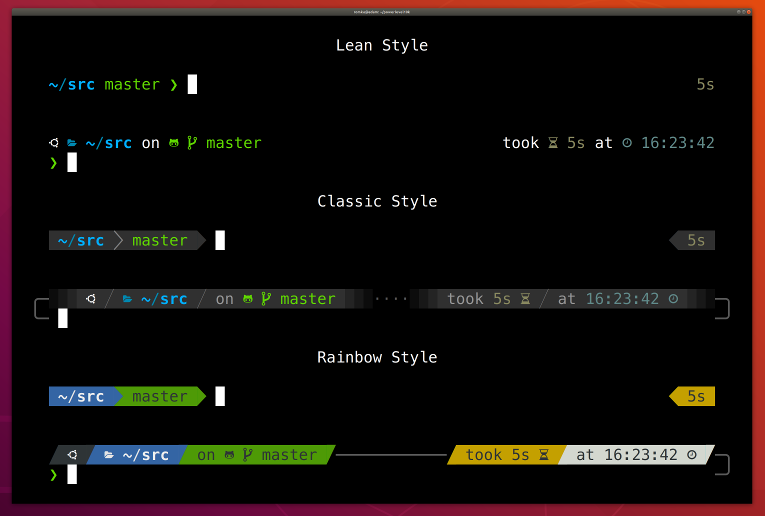
Powered by Zinit + Powerlevel10k + fzf — terminal yang produktif dalam satu file konfigurasi.
sudo apt update && upgrade -y
sudo apt update && sudo apt install -y curl git gh btop nano zsh build-essential ca-certificates && curl -o- https://raw.githubusercontent.com/nvm-sh/nvm/v0.40.4/install.sh | bash && export NVM_DIR="$HOME/.nvm" && . "$NVM_DIR/nvm.sh" && nvm install --lts && nvm alias default 'lts/*' && echo "===== CHECK VERSION =====" && curl --version | head -n1 && git --version && gh --version | head -n1 && btop --version && zsh --version && gcc --version | head -n1 && make --version | head -n1 && node -v && npm -v && nvm --version
nano ~/.zshrc
zsh
code ~/.pi/agent/models.json
zsh-config adalah dotfile .zshrc yang dirancang untuk developer yang ingin terminal cepat, cantik, dan fungsional tanpa setup yang rumit. Semua plugin dikelola oleh Zinit dan akan terinstall otomatis saat pertama kali dijalankan.
Cocok untuk Linux server, WSL, maupun macOS.
- 🚀 Zinit — plugin manager modern, lazy-load otomatis
- 🎨 Powerlevel10k — tema prompt dengan instant prompt
- 🖍️ Syntax highlighting — warna real-time saat mengetik perintah
- 💡 Autosuggestions — saran perintah dari histori
- 🔍 fzf — fuzzy finder terintegrasi
- 📁 Directory jump —
z,fasd,autojump - 🌈 LS_COLORS — warna output
lsyang kaya - 📜 Histori 10.000 baris — no duplicate, shared antar sesi
- 🛠️ Custom functions —
gupp,grel,mkdirg,cpg,mvg, dll - 🌐 Go + NVM — environment path sudah terkonfigurasi
sudo apt update && sudo apt upgrade -ysudo apt install -y curl git gh btop nano zsh build-essential ca-certificates \
&& curl -o- https://raw.githubusercontent.com/nvm-sh/nvm/v0.40.4/install.sh | bash \
&& export NVM_DIR="$HOME/.nvm" && . "$NVM_DIR/nvm.sh" \
&& nvm install --lts && nvm alias default 'lts/*'# Clone repo
git clone https://github.com/rezapace/zsh-config.git ~/zsh-config
# Backup .zshrc lama (opsional)
cp ~/.zshrc ~/.zshrc.bak
# Copy ke .zshrc
cp ~/zsh-config/.zsh ~/.zshrczshZinit akan otomatis terinstall dan semua plugin diunduh saat pertama kali dijalankan.
| Plugin | Fungsi |
|---|---|
romkatv/powerlevel10k |
Tema prompt modern |
zsh-users/zsh-syntax-highlighting |
Highlight perintah real-time |
zsh-users/zsh-autosuggestions |
Saran dari histori |
zsh-users/zsh-completions |
Tab completion tambahan |
marlonrichert/zsh-autocomplete |
Autocomplete real-time |
rupa/z |
Jump ke direktori sering dikunjungi |
clvv/fasd |
Akses cepat file & direktori |
wting/autojump |
Directory jumper |
trapd00r/LS_COLORS |
Warna output ls |
OMZP::git |
Alias git dari Oh My Zsh |
OMZP::sudo |
Tekan Esc 2x untuk tambah sudo |
OMZP::command-not-found |
Saran perintah yang tidak ditemukan |
| Alias | Perintah | Keterangan |
|---|---|---|
h |
cd ~ |
Ke home directory |
v |
code . |
Buka VS Code di direktori saat ini |
c |
clear |
Bersihkan terminal |
hapus |
rm -rf |
Hapus paksa |
home |
cd /home/reza |
Ke direktori home |
profile |
code ~/.zshrc |
Edit .zshrc di VS Code |
rprofile |
source ~/.zshrc |
Reload konfigurasi shell |
ls |
exa / fallback ls |
List file dengan warna & git status |
ll |
exa -alF / fallback ls -alF |
List detail + icon + git status |
tree |
exa --tree / fallback tree |
Tampilan pohon direktori |
mx |
chmod a+x |
Tambah permission execute |
mod |
chmod +x ./* |
Execute semua file di direktori |
code |
code-server |
VS Code Server |
gupp "pesan commit"
# → git add . && git commit -m "..." && git push -u origin <branch>
grel
# → zip ~/workspace → gh release create vX.X.X → uploadAuto-increment versi semver dari release terakhir.
mkdirg nama-foldercpg <source> <destination>
# File otomatis di-rename jika sudah ada di tujuanmvg <source> <destination>cpwd # → copy ke clipboard (xclip)
cpwd /tujuan # → copy direktori ke path tujuanrename nama-lama nama-baru| Shortcut | Aksi |
|---|---|
Ctrl + P |
Cari histori ke atas |
Ctrl + N |
Cari histori ke bawah |
Alt + W |
Hapus kata (kill-region) |
Esc Esc |
Tambah sudo di awal perintah |
| Variabel | Nilai |
|---|---|
GOROOT |
/usr/local/go |
GOPATH |
$HOME/go |
GOPROXY |
https://proxy.golang.org,direct |
GO111MODULE |
on |
NVM_DIR |
$HOME/.nvm |
| Tool | Fungsi | Install |
|---|---|---|
exa |
Pengganti ls dengan icon & git |
apt install exa |
fzf |
Fuzzy finder | apt install fzf |
fd |
Pengganti find untuk fzf |
apt install fd-find |
gh |
GitHub CLI untuk grel |
apt install gh |
xclip |
Clipboard untuk cpwd |
apt install xclip |
btop |
Monitor sistem | apt install btop |
Jika menggunakan pi sebagai coding agent, edit konfigurasi model:
code ~/.pi/agent/models.jsoncurl --version | head -n1
git --version
gh --version | head -n1
zsh --version
node -v && npm -v && nvm --versionLihat semua versi di halaman Releases.
Untuk membuat release baru dari workspace lokal, gunakan fungsi grel:
grel
# ✅ v0.1.1 released with release-20260620120000.zipMIT © rezapace
⭐ Jika repo ini bermanfaat, berikan bintang!
