This is an excerpt from GreenHeat tutorial which covers the installation steps and more. If any information is missing it should be in that webpage.
id: the twitch id (or an opaque id if permission was not given) of the person.
type: the type of the message. could be "click", "drag", "hover" or "release".
x and y: the position normalized from 0 to 1. it is made this way to be compatible with legacy heat's schema.
button: the mouse button that was used, defaults to "left" for mobile and unknown, but also can be "middle" or "right".
shift, ctrl and alt: boolean, whether these modifier buttons are used while clicking.
time: the timestamp in milliseconds when the message was formed.
latency: the stream latency between source and viewer. ONLY ACCOUNTS ONE WAY! you might have to figure out your delay to twitch and add it to the total latency.
Due to the nature of the internet and everyone living across the ocean, there are stream delay that makes real-time interaction quite challenging.
GreenHeat gives you everything you need to overcome this problem, allowing for things like the fruit ninja clone in GreenHeat Games.
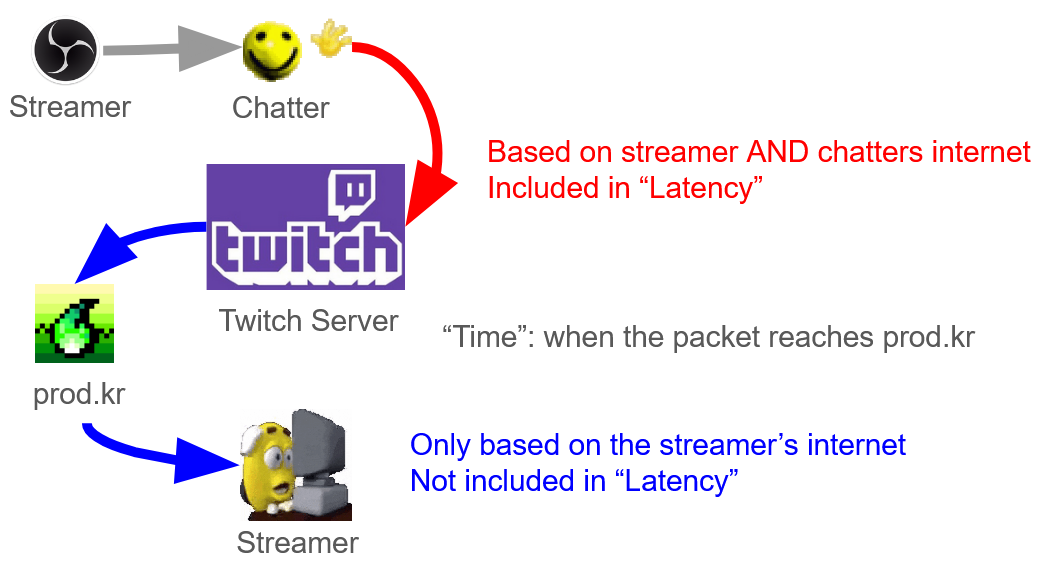
Two fields, time and latency are important in the packet. latency refers to the time it took for the click packet to arrive from chatter's PC to Twitch's servers, where time refers to the point in time where the packet reached prod.kr. The goal is to get the timestamp for when the chatter clicked the screen, so it would feel accurate to the chatter.
Keep in mind that for backwards compatiblities reasons time is in milliseconds but latency is in seconds, so you want to multiply latency by 1000 before subtracting them.
in addition to just doing time - (latency * 1000), you also want to subtract another kind of latency (labelled blue in the image) - a global latency of sorts. This number is mostly constant across all packets regardless of the viewer, but is dependent on your internet setup.
You can get the global latency by clicking on the screen yourself and doing Date.now() - time - (latency * 1000). ("time" is the time field in the packet, "date.now" is the current time in milliseconds, any sane language should have an equivalent.)
Note that you can't get the global latency through clicking on the offline testing site, since it does not go through Twitch API and calls directly through prod.kr.
My global latency is 0.68 seconds, use this as reference to if you got a wildly smaller or bigger number than this.