A sleek and intuitive Todo List Application that helps you organize your tasks efficiently. Built with HTML, CSS, and JavaScript, this app ensures that your tasks are managed effortlessly and persistently using browser local storage.
This version represents a significant upgrade from the original, focusing on user experience, data integrity, and architectural flexibility.
- Dual Storage Engine: The application is built to work with two backends:
- LocalStorage (Standalone): All data is saved directly in your browser. Perfect for offline use, privacy, and a self-contained experience.
- API (Cloud-Based): Seamlessly connects to a Node.js + MongoDB backend. Data is persisted on a server, allowing for syncing across devices and advanced data management. The app structure cleanly separates concerns, making it easy to toggle between the two.
- Real-Time User Feedback: No more guessing if an action worked. The app now features:
- Toast Notifications: Non-intrusive pop-up messages that inform you of success (e.g., "Task added!") or errors (e.g., "Failed to update todo.").
- Loading States: Buttons show "Adding...", "Saving...", etc., providing clear visual feedback during async operations.
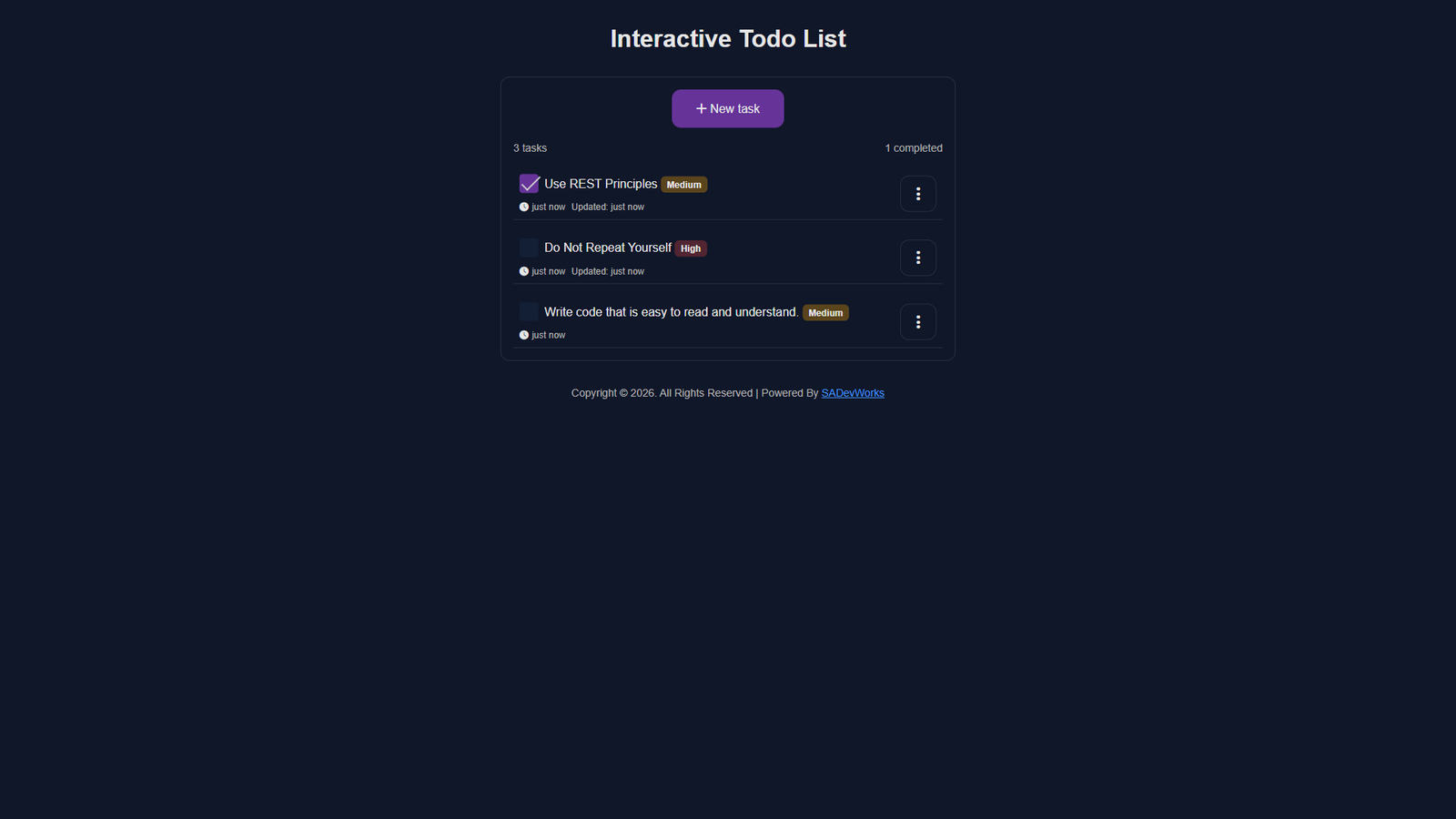
- Task Timestamps: Track when a task was created and last updated. Timestamps are displayed dynamically, with "just now" showing immediately after a change.
- Dynamic Task Counters: A live counter displays the total number of tasks and the number of completed tasks, updating instantly as you add, complete, or delete items.
- Task Priority Levels: Assign a priority (e.g., High, Medium, Low) to each task for better organization. Priorities are visually distinct.
- Empty State Handling: A friendly, clear message is displayed when you have no tasks, improving the overall user experience.
- Modular Code Architecture: The JavaScript codebase has been refactored into clean, separate modules:
index.js: Main application logic and event handling.
api.js: Handles all API calls for the cloud-based backend.
localStorage.js: Handles all CRUD operations for the local backend.
templates.js: Manages dynamic HTML generation for tasks, toast messages, and empty states.
functions.js: Shared utility functions.
Improved Modals: Separate modals for "Add Task" and "Edit Task" ensure a clean and focused user flow.
Robust Error Handling: Comprehensive try...catch blocks and validation ensure the app gracefully handles network errors, invalid inputs, and other edge cases.
There are two ways to run this application, depending on which backend you wish to use.
- Clone the repository:
git clone https://github.com/nvmwhoiam/todo-list-app.git
- Navigate to the project directory:
cd todo-list-app - Open
index.htmlin your web browser to view the application.
Option 1: Standalone Mode (LocalStorage Only - No Backend Required)
- To enable LocalStorage mode, you will need to comment/uncomment the relevant sections in the index.js file. The code is clearly marked with // Todo: Implement local storage... and // Todo: Implement fetch API... comments to guide you.
Option 2: Cloud Mode (API + MongoDB - Requires Backend Server)
This mode connects to a Node.js backend server that stores your tasks in a MongoDB database. Perfect for syncing across devices or for learning full-stack development.
- Install backend dependencies:
npm installThis installs the required packages:
express- Web server frameworkmongoose- MongoDB ODMcors- Cross-origin resource sharingdotenv- Environment variable management- (Other dependencies as listed in
package.json)
- Set up MongoDB:
Method 1: Direct Installation
- Download and install MongoDB from mongodb.com
- Start MongoDB service:
- Windows:
net start MongoDB(as Administrator) - macOS/Linux:
sudo systemctl start mongodorbrew services start mongodb-community
- Windows:
Method 2: Docker (if you have Docker installed)
docker run -d --name mongodb -p 27017:27017 mongo:latestThis one-liner pulls the MongoDB image and runs it in a container with default settings. To manage the container:
docker stop mongodb   # stop the container
docker start mongodb  # start it again
docker rm mongodb     # remove container (stop first)
The default connection URL is mongodb://localhost:27017/todo-list-app
- Create a free account at mongodb.com/atlas
- Create a new cluster (the free tier works perfectly)
- Get your connection string
mongodb+srv://<username>:<password>@cluster.mongodb.net/todo-list-app - Add your IP address to the network access list
- Configure environment variables:
- In the backend directory, create a
.envfile:
touch .env - Edit
.envand add your MongoDB connection string:
MONGODB_URI=mongodb://localhost:27017/todo-app
PORT=3000
- If using MongoDB Atlas, use your cloud connection string instead.
MONGODB_URI=mongodb://localhost:27017/todo-app
- Start the backend server:
npm run devStartYou should see: Server running on http://localhost:3000 and MongoDB connected successfully
Enable API Mode in the frontend:
- Open
assets/js/index.jsin a code editor. - Comment out the LocalStorage function calls (the lines with
// const response = toDoCreate(...)). - Uncomment the API function calls (the lines with
// const response = await toDoCreateApi(...)).
The core functionality remains intuitive, now with enhanced feedback.
- Add a Task
- Click the New Task button.
- Enter a Task Title (required) and select a Priority.
- Click Add task. You'll see a success toast message, and the task will appear in your list with its creation timestamp.
- Edit a Task
- Click the dropdown menu (
...) next to a task and select Edit. - A modal will open with the task's current details.
- Modify the title or priority and click Save. The task list will update instantly, and you'll see a success message.
- Mark as Completed
- Use the checkbox next to a task.
- The task's appearance will change (e.g., a strikethrough), the completed tasks counter will update, and you'll receive a confirmation toast.
- Delete a Task
- Click the dropdown menu next to a task and select Remove.
- The task will be permanently removed from the list and storage. The total tasks counter will update. If it was your last task, the empty state message will appear.
- View Task Info
- Each task now shows its priority (UI only, not filtering by priority for now) and a timestamp indicating when it was created or last updated.
-
Frontend:
- HTML5: Semantic structure.
- CSS3: Modern, responsive layout and animations.
- JavaScript (ES6+): Core application logic, async/await for API calls, modular architecture.
- Local Storage API: For standalone data persistence.
-
Backend (Optional):
- Node.js & Express: RESTful API server.
- MongoDB & Mongoose: NoSQL database for data persistence.
- API: Standard HTTP requests (GET, POST, PATCH, DELETE) for communication.
Adding a Task
- Click the New Task button to open the modal.
- Enter the task title (required).
- Click the Add Task button to add it to the list.
Editing a Task
- Click the dropdown menu next to the task and select Edit.
- Modify the title or description in the modal and save changes.
Deleting a Task
- Click the dropdown menu next to the task and select Remove.
- The task will be permanently deleted.
Marking as Completed
- Use the checkbox next to a task to toggle its completed status.
- Completed tasks will appear visually distinct.
Try the live demo here: Todo List App Demo
Here are some ideas to improve the app:
- Search and Filter: Add a search bar to quickly find tasks.
- Task Priorities: Allow users to prioritize tasks (e.g., High, Medium, Low).
- Drag-and-Drop: Enable reordering of tasks through drag-and-drop functionality.
- Due Dates: Add deadlines and reminders for tasks.
- Dark Mode: Introduce a toggle for light and dark themes.
- Technology Stack Options:
- Backend: PHP with MySQL
- Frontend: Add EJS for server-side rendering (SSR) if using Node.js/Express
- Confirm MongoDB service is running
- Check CORS configuration
- Verify
.envvariables are set correctly
If you have any questions or need assistance, please do not hesitate to reach out. I apologize if any part of this setup is not clear; this is my first major project, and I am putting in continuous effort to improve it. Feel free to contact me at info@sadevworks.com or open an issue on the GitHub Repository.
Contributions are welcome! Please open an issue or submit a pull request for any improvements or bug fixes.
This project is licensed under the MIT License. See the LICENSE file for more details.
- Email: info@sadevworks.com
- Website: sadevworks.com
- GitHub: @nvmwhoiam