



Third Party Patcher (TPP) is a macOS daemon-based patching system for IT administrators. It automatically discovers installed third-party applications, checks for available updates, downloads installers in the background, and applies them — with optional user-facing prompts via swiftDialog so users stay informed without being blocked.
Updates are driven by Installomator label files, which Third Party Patcher downloads and keeps current automatically. Custom and override labels can be supplied by the IT team without modifying the Installomator project.
Patching is divided into four phases, each on its own configurable schedule:
| Phase | What it does |
|---|---|
| Scan | Discovers installed apps by evaluating Installomator labels |
| Check | Looks up available versions and marks apps that need updating |
| Stage | Downloads and validates installers in the background |
| Apply | Installs staged updates; prompts the user if a blocking process is running |
A LaunchDaemon wakes patcherscheduler every 10 minutes. Each wake is cheap — it exits in milliseconds when nothing is due. Phases run on independent intervals and can also be triggered on demand from the command line or from the user-facing apps.
See the How It Works wiki page for a full walkthrough.
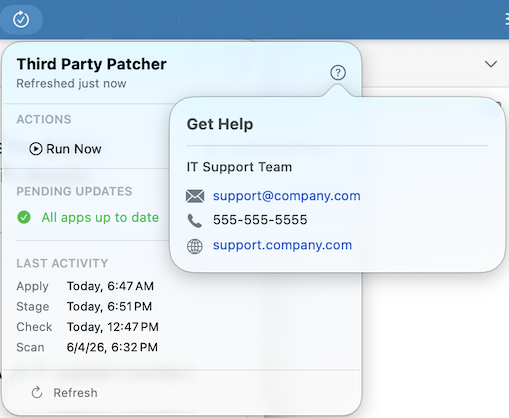
An optional menu bar app that gives users real-time visibility into patch status. The icon updates automatically when updates are staged or pending, and the popover shows:
- Pending updates (staged and ready to apply)
- Pending downloads (detected but not yet staged)
- Deadline countdown details
- Per-phase last-activity timestamps
- A Run Now drop-down to trigger any patching phase immediately
PatcherMenu is enabled with a single preference key and fully configurable via MDM.
See the PatcherMenu wiki page for configuration details.
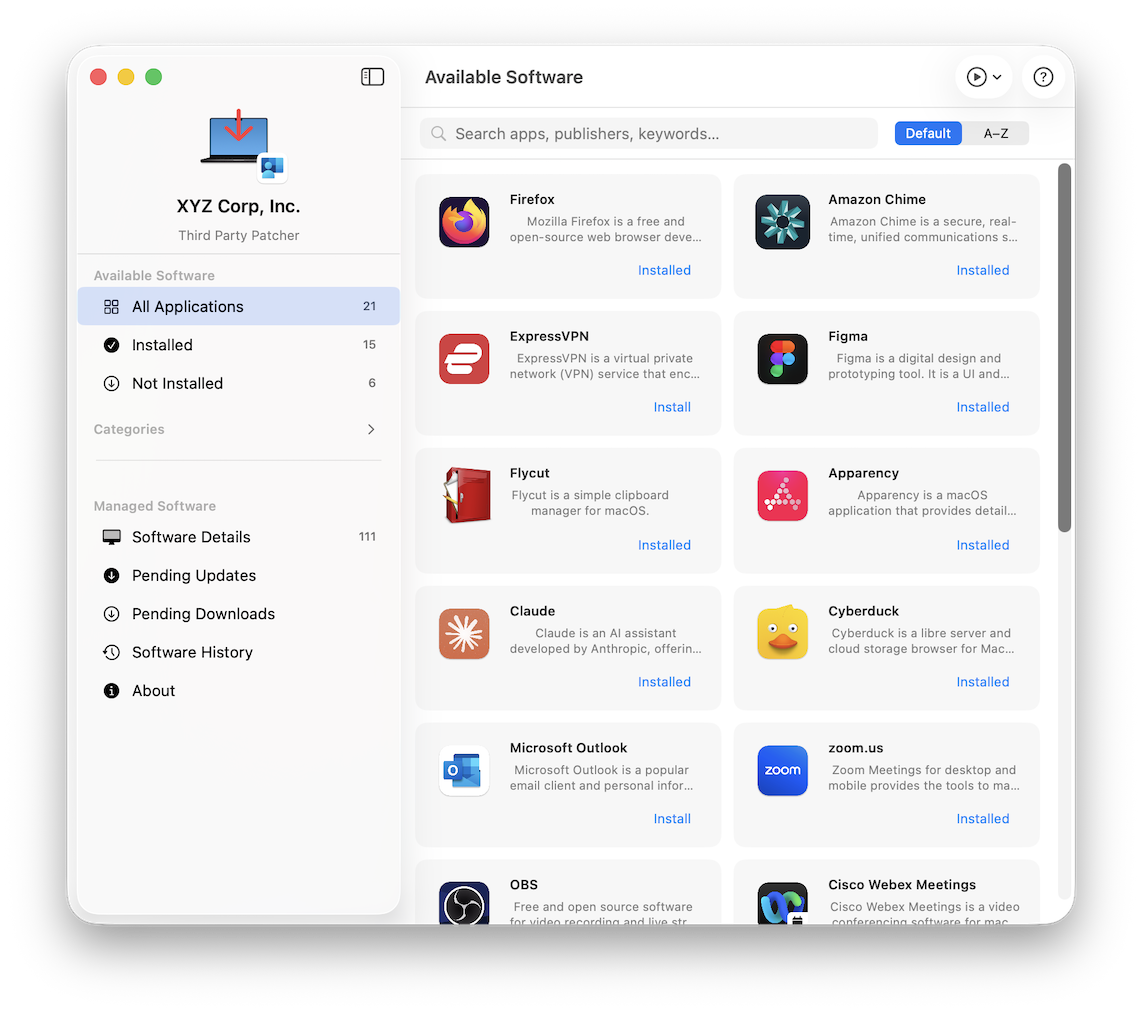
A standalone window app that gives users a self-service software catalog and a full view of every app under patcher management.
Catalog — IT-configured optional software titles users can install on demand, with icons, descriptions, publisher info, and per-app install history. Titles are drawn from the OptionalLabels preference.
Managed Software — every app currently discovered and tracked by patcher, with update status, install paths, and history.
Pending Updates / Pending Downloads — current staged and detected updates, with buttons to trigger apply or stage phases immediately.
Update History — a chronological log of every patch event (applied, self-service install, discovered), filterable by type.
Toolbar Run Now menu — a play.circle button triggers any patching phase directly from the window, with the same actions and preference controls as PatcherMenu's Run Now menu.
See the Available Software wiki page for configuration details.
Default phase intervals:
| Phase | Default interval |
|---|---|
| Scan | 30 days |
| Check | 4 hours |
| Stage | 4 hours |
| Apply | 24 hours |
An optional monthly patching cadence mode gates the Apply phase to a specific weekday occurrence (e.g., second Tuesday of the month). A configurable startup jitter delays the first post-boot run by a random offset to prevent fleet-wide simultaneous downloads.
See the Scheduling wiki page for interval keys and monthly mode configuration.
All interactive UI uses swiftDialog, launched in the console user's session via launchctl asuser. Key prompt moments:
- Non-blocking progress — a mini status window during Scan, Check, and Stage that auto-dismisses
- Deferral prompt — shown before Apply when blocking processes are detected; users choose a defer duration or allow the update
- Full-screen Apply progress — per-app status rows during installation
- Blocking process prompt — lets users quit a running app to proceed or skip the update
Users can defer with a configurable menu of time options. Focus/DND detection silently defers without incrementing the deferral counter, so presentations and meetings don't push users toward a deadline.
Two deadline thresholds control enforcement:
| Threshold | Default | Behavior |
|---|---|---|
| Focus deadline | 4 days | Focus/DND no longer silently defers |
| Hard deadline | 14 days | Defer button removed; update applies unconditionally |
See User Prompts and Deferral and Deadlines for configuration details.
The patcherreport binary generates compliance reports from local state files without running any patching actions (no sudo required):
| Subcommand | Output |
|---|---|
summary |
One-line compliance overview |
pending |
Staged updates awaiting installation |
recent |
Successfully patched apps within N days |
broken |
Labels that failed to resolve or download |
never-updated |
Apps with no successful apply on record |
label |
Full chronological event history for one app |
deferrals |
Audit log of every dialog interaction and user choice |
See the Reporting wiki page for usage and output format.
Three command-line tools are installed to /usr/local/bin/tpp/:
| Binary | Purpose |
|---|---|
patcher |
Runs individual patching phases on demand |
patcherscheduler |
Daemon entrypoint; also provides a status subcommand |
patcherreport |
Generates patch compliance reports |
Two optional user-facing apps are installed to /Applications/:
| App | Purpose |
|---|---|
PatcherMenu.app |
Menu bar status and Run Now trigger (LaunchAgent) |
Available Software.app |
Self-service catalog and management view |
See the Command-Line Reference wiki page for full CLI documentation.
- macOS 14 Sonoma or later
- swiftDialog 2.x or later (for user prompts; install via
patcher ensure swiftdialog) - Network access to GitHub (for Installomator label updates and app downloads)
Deploy the signed and notarized .pkg via your MDM. The package installs the three binaries, the LaunchDaemon plist, and loads the daemon immediately. PatcherMenu and Available Software are included and enabled via preference keys.
See the Installation wiki page for full details, prerequisites, and uninstall instructions.
All settings are managed through the com.gilburns.patcher preference domain, deployable as an MDM configuration profile.
/Library/Managed Preferences/com.gilburns.patcher.plist   ← MDM (preferred)
/Library/Preferences/com.gilburns.patcher.plist           ← local override
See the Preference Keys wiki page for a full reference of every available key.
Migrating from App Auto-Patch? Preference key names are largely compatible. The main difference is that Third Party Patcher uses native plist booleans (
<true/>/<false/>) rather than strings (<string>TRUE</string>). See the compatibility note for details.
You can supply your own Installomator-compatible .sh label files to override existing labels or add support for internal applications not in the public Installomator repository.
/Library/Application Support/Patcher/Managed/Labels/   ← your label files
/Library/Application Support/Patcher/Managed/Version.txt
See the Managed Labels wiki page for the full guide.
Full IT-admin documentation is available in the project wiki:
- Home
- Installation
- How It Works
- Scheduling
- User Prompts
- Deferral and Deadlines
- PatcherMenu
- Available Software
- Command-Line Reference
- Preference Keys
- Installomator Integration
- Managed Labels
- Reporting
- Logs and Troubleshooting
- Contributing
Third Party Patcher is released under the MIT License.