
📖 English · Tiếng Việt




Node.js bridge connecting zca-js (unofficial personal Zalo API) to the Hermes Agent gateway. It lets you chat with your Hermes agent from a personal Zalo account.
Zalo servers <──> [ this bridge: Node + zca-js ] <──> [ Hermes adapter: platform "zalo" ]
- Zalo ↔ bridge: inbound events arrive over a ws listener; outbound actions (send / upload / react…) go out over HTTPS to Zalo's API.
- bridge ↔ Hermes — inbound (Zalo → Hermes): Server-Sent Events at
GET /events(heartbeat every 15s +Last-Event-IDreplay from a ring buffer). - bridge ↔ Hermes — outbound (Hermes → Zalo): REST
POST /send,/send-attachment,/send-sticker,/send-voice,/typing.
Why zca-js (over an unofficial Python Zalo client)? Both are unofficial, reverse-engineered clients for the personal Zalo account API — neither is blessed by Zalo. We picked zca-js because it's more actively maintained and has a richer feature surface than the Python equivalents: it keeps up with Zalo's protocol changes and covers messages, media, stickers, reactions, groups, polls, friends… the full 145-method API this bridge exposes. The trade-off of that choice — zca-js is TypeScript while Hermes is Python — is exactly what the thin Node bridge pays for.
⚠️ zca-js is UNOFFICIAL. Use a secondary Zalo account. Zalo may rate-limit or lock accounts that automate. You accept that risk.
Before installing, make sure you have:
| Requirement | Why | How to get it |
|---|---|---|
Node.js ≥ 18 (with npm) |
runs the bridge | macOS: brew install node · Linux: nvm or distro nodejs · Windows: nodejs.org LTS installer. Verify: node -v |
| A Zalo account (secondary recommended) | the bridge logs in as this account | Zalo mobile app to scan the QR |
| Hermes Agent installed | the chat agent that talks to the bridge | the hermes CLI on PATH |
Python aiohttp |
the Hermes-side Zalo adapter uses it for HTTP/SSE | pip install aiohttp (the hermes gateway setup Zalo flow also reminds you) |
The installer checks Node + npm and stops with a clear message if either is
missing — it won't run half-way and leave you confused. zca-js itself needs no
build tools (no bun, no compiler); it's pulled prebuilt from npm.
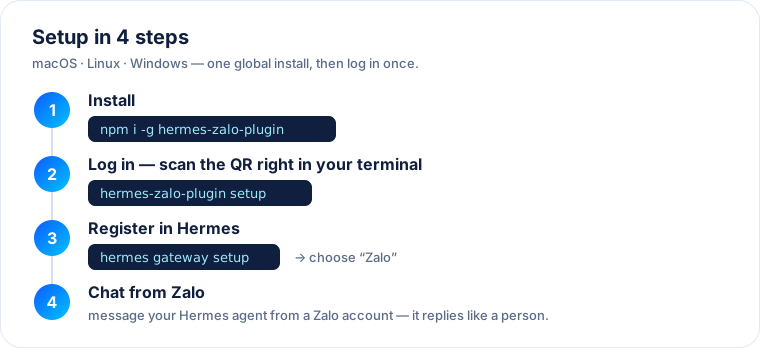
Works on macOS, Linux, and Windows — Node drives everything; no bun, no
build-from-source (zca-js is pulled from npm).
Prerequisite: Node.js ≥ 18 (nodejs.org).
Install from npm (recommended):
npm install -g hermes-zalo-plugin
hermes-zalo-plugin setup      # QR login + background service
Or from a source checkout:
# macOS / Linux
./install.sh

# Windows (PowerShell)
.\install.ps1
The setup step:
- installs dependencies (when run from source),
- walks you through QR login (scan once; credentials are saved to
~/.hermes-zalo/), and - installs a background service that auto-starts the bridge on login/boot and restarts it on crash — launchd (macOS), systemd user unit (Linux), or a Scheduled Task (Windows).
CLI commands: hermes-zalo-plugin setup | login | start | stop | status | uninstall.
Then register it in Hermes:
hermes gateway setup     # choose "Zalo" (🇻🇳)
hermes gateway           # start relaying
That's it — login + setup are one-time; the bridge stays alive on its own.
| Flag | Effect |
|---|---|
--no-service |
Install deps + login only; run the bridge yourself with npm start. |
--relogin |
Force a fresh QR login (e.g. after the session expired). |
--service-only |
(Re)install just the background service. |
Remove the background service (credentials kept):
node uninstall.mjs            # stop + remove auto-start service
node uninstall.mjs --purge # also delete saved credentials (logout)If you'd rather not use the installer:
npm install                  # pulls zca-js from npm
node login.mjs               # QR login (--force to re-scan)
npm start                    # run the bridge in the foreground
You can also fetch the QR while the server runs:
GET /qr (JSON with base64 image) or GET /qr.png (raw PNG).
| Var | Default | Meaning |
|---|---|---|
ZALO_PLUGIN_PORT |
8787 |
Listen port |
ZALO_PLUGIN_HOST |
127.0.0.1 |
Bind host (keep loopback unless you add TLS) |
ZALO_PLUGIN_TOKEN |
(none) | Shared secret; if set, required on every route (header x-bridge-token, Authorization: Bearer, or ?token=) |
ZALO_DATA_DIR |
~/.hermes-zalo |
Base dir for all runtime data (credentials, QR, undo-cache, logs). Set ./data for the old in-repo layout. The per-file vars below override individual paths. |
ZALO_CREDENTIALS_PATH |
~/.hermes-zalo/credentials.json |
Where credentials persist |
ZALO_QR_PATH |
~/.hermes-zalo/qr.png |
Where the QR PNG is written |
ZALO_SELF_LISTEN |
off | Receive your own outgoing messages too |
ZALO_FORCE_QR |
off | Ignore saved credentials and re-QR |
ZALO_CLIMSG_RETENTION_DAYS |
30 |
Days to keep the undo cache (msgId→cliMsgId) on disk under ~/.hermes-zalo/climsgids/ (daily-rotated JSONL, auto-pruned). Reloaded on startup so message recall (undo) survives restarts. 0 disables persistence (memory-only). |
ZALO_ALLOWED_ACTION_GROUPS |
read,send,interact |
Comma-separated permission groups, by danger level: read < send < interact < manage < destructive (or all). Gates BOTH /api/<method> and the first-class routes. |
ZALO_ALLOW_DESTRUCTIVE |
false |
Must be true to permit the destructive group (disperseGroup, deleteMessage, deleteChat, removeFriend, blockUser, leaveGroup, changeGroupOwner, updateProfile/Settings…). OFF even when groups=all. |
ZALO_ALLOWED_ACTIONS |
(none) | Custom allowlist — comma-separated zca-js method names always permitted regardless of group. |
ZALO_DENIED_ACTIONS |
(none) | Custom denylist — comma-separated method names always blocked. Highest precedence (beats allowlist, groups, everything). |
The bridge classifies all 145 zca-js actions into 5 groups by danger level and
refuses any action not permitted by the policy with HTTP 403. Precedence:
ZALO_DENIED_ACTIONS— always blocked.ZALO_ALLOWED_ACTIONS— always allowed.destructivegroup — only ifZALO_ALLOW_DESTRUCTIVE=true.ZALO_ALLOWED_ACTION_GROUPS— the method's group must be listed.
Group sizes: read 55, send 12, interact 13, manage 39, destructive 26. The full
map lives in permissions.js (auto-generated). GET /policy returns the live
policy and the resolved allowed-action list.
These are adapter-side env vars (set where hermes gateway runs), Telegram-style
— leave empty to allow everyone/everywhere:
| Var | Default | Effect |
|---|---|---|
ZALO_ALLOWED_USERS |
(empty=all) | CSV of sender uids permitted to command the bot. |
ZALO_ALLOWED_THREADS |
(empty=all) | CSV of thread/group ids the bot operates in. |
ZALO_GROUP_MODE |
mention |
In groups: mention (only when @mentioned or replied-to — detected by real uid, not text guessing), all (every message), or off (DM only). |
ZALO_LOG_IDS |
false |
Log each inbound uid/threadId so you can discover ids for the allowlists. |
The setup wizard (hermes gateway setup → Zalo) fetches /contacts and lets you
search by name and pick instead of typing raw ids.
Defaults to be aware of (note the asymmetry):
- Users — leave
ZALO_ALLOWED_USERSempty and anyone may talk to the bot (allow-all, Telegram-style).- Groups — in
hermes gateway setup, if you pick no group, the wizard setsZALO_GROUP_MODE=off: the bot stays out of every group and won't reply even when @mentioned. DMs / 1-1 chats still work. Pick specific groups to then choose how it behaves there (mention/all/off).
zca-js is unofficial; hammering getUserInfo/getGroupInfo/getAllGroups/getAllFriends
risks a temporary block. The bridge caches these by id with a TTL, serializes
them with a minimum gap, and backs off (serving stale cache) on a suspected
rate-limit:
| Var | Default | Effect |
|---|---|---|
ZALO_INFO_CACHE_TTL |
600 (s) |
TTL for cached read-info results. |
ZALO_INFO_MIN_INTERVAL_MS |
1500 |
Minimum ms between read-info calls; exponential backoff (cap 5 min) on rate-limit errors. |
GET /health→{ ok, loggedIn, sessionDead, sessionDeadReason, ownId, qr, sseClients }GET /qr/GET /qr.png→ QR state / PNGGET /events→ SSE stream (event: message/status/session_dead/reaction/undo/friend_event/group_event)POST /relogin→{ forceQR? }recover a dead/expired session (re-run QR login; then poll/qr.pngto scan)POST /shutdown→ graceful stop (closes listener, SSE, file streams, exits). SIGTERM/SIGINT do the same.POST /send→{ threadId, threadType: "user"|"group", text, mentions?, quote? }(mentions =[{pos,uid,len}]for @mention; quote = a SendMessageQuote from an inbound message for replies)POST /react→{ threadId, threadType, msgId, cliMsgId?, icon }(icon = HEART/LIKE/HAHA/WOW/CRY/ANGRY/… or raw)POST /undo→{ threadId, threadType, msgId }(recall own message; bridge auto-resolves the real cliMsgId from the listener echo cache — just pass msgId)POST /send-card→{ threadId, threadType, userId, phoneNumber? }(send a contact card / danh thiếp)POST /friend/request|accept|reject→{ userId, msg? }GET /friends→ list all friends ·GET /find-user?phone=→ look up by phoneGET /groups→ list all groups (rawgridVerMap)GET /contacts→{ groups:[{id,name}], friends:[{id,name}] }— friendly id+name list for the setup wizard (batched + cached + rate-limited)POST /group/create{name, members[]}·/group/add/group/remove/group/rename/group/deputy{groupId, members[]|name}·/group/leave{groupId, silent?}POST /poll/create→{ groupId, question, options[], expiredTime?, allowMultiChoices?, allowAddNewOption?, hideVotePreview?, isAnonymous? }POST /api/<method>→{ args: [...] }— generic passthrough to ANY zca-js API method (full 145-API parity). Pass args positionally as zca-js documents; use"user"/"group"where a ThreadType is needed (auto-converted). Examples:/api/forwardMessage,/api/deleteMessage,/api/sendVideo,/api/getGroupMembersInfo,/api/getGroupChatHistory,/api/createReminder,/api/setMute,/api/votePoll,/api/blockUser,/api/updateProfile. Unknown method → error.POST /send-attachment→{ threadId, threadType, path | paths[], caption? }(local file paths; images/files/video auto-routed by extension)POST /send-sticker→{ threadId, threadType, sticker: { id, cateId, type } }GET /stickers?keyword=hi&limit=5→ search stickers, returns full{ id, cateId, type, ... }objects ready to pass to/send-stickerPOST /send-voice→{ threadId, threadType, voiceUrl }POST /typing→{ threadId, threadType }GET /chat-info?threadId=..&threadType=user|group
Inbound message event shape:
{
  "messageId": "...", "cliMsgId": "...",
  "threadId": "...", "threadType": "user|group",
  "senderId": "...", "senderName": "...", "text": "...",
  "attachment": null,
  "media": null,                 // {kind,url,fileName,ext,mime,size} for image/voice/file/video
  "msgType": "webchat",
  "mentions": [],                // group only: uids @mentioned in this message
  "quotedOwnerId": "",           // uid of the owner of the quoted msg (set on replies)
  "quote": { "...": "..." },     // raw quote payload to build a reply
  "ts": "...", "isSelf": false
}
mentions and quotedOwnerId are what the adapter uses to detect "the bot was
addressed" in groups (real uid match, not text guessing).
hermes-zalo-plugin setup (and the source install.sh / install.ps1) already
bundle and auto-install the Hermes-side adapter — it copies hermes-plugin/
into ~/.hermes/plugins/zalo/ and enables zalo-platform in
~/.hermes/config.yaml, so you normally don't place any files yourself. What's
left is telling the bot who and what it may talk to:
hermes gateway setup # choose "Zalo"The wizard asks for the bridge URL/token, then — with the bridge already logged
in — fetches your groups and friends (GET /contacts) and lets you search by
name and pick which users / threads the bot may talk to, the group response
mode, action permissions, and cache retention. It writes everything to
~/.hermes/.env.
export ZALO_PLUGIN_URL="http://127.0.0.1:8787"
# Access control (Telegram-style: leave empty = allow everyone/everywhere)
# export ZALO_ALLOWED_USERS="<uid1>,<uid2>"      # restrict senders
# export ZALO_ALLOWED_THREADS="<groupId>,<uid>"  # restrict groups/DMs
# export ZALO_GROUP_MODE="mention"               # mention | all | off
pip install aiohttp                               # if not already present
hermes gateway   # the Zalo adapter connects to the bridge and starts relaying
Run the bridge first (logged in), then the Hermes gateway.
⚠️ ZALO_ALLOW_ALL_USERSandZALO_GROUP_REQUIRE_MENTIONare DEPRECATED. LeaveZALO_ALLOWED_USERSempty to allow everyone; useZALO_GROUP_MODEinstead of the old mention flag.
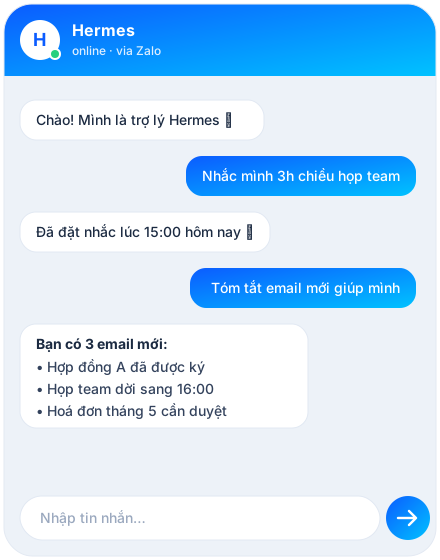
- Chat 1-1: message the Zalo account from another phone → the agent replies
(subject to
ZALO_ALLOWED_USERS). - In a group: by default (
ZALO_GROUP_MODE=mention) the bot only answers when @mentioned or when someone replies to one of its messages. Setallto answer every message, oroffto ignore groups. - Find an ID later: set
ZALO_LOG_IDS=true, send a message, and read theuid=… threadId=…line in the gateway log; add it to the allowlist. - Change who/what is allowed: edit the
ZALO_*vars in~/.hermes/.env(adapter-side: users/threads/mode) or the bridge's env (action permissions, rate-limit), then restart the gateway / bridge. - Send media / stickers / reactions / polls: the agent calls the bridge
routes above; everything in the 145-API surface is reachable via
POST /api/<method>subject to the action-permission policy.
| Symptom | Cause / fix |
|---|---|
/health shows loggedIn:false |
Session not established — run ZALO_FORCE_QR=1 node server.js and scan, or POST /relogin. |
/health shows sessionDead:true |
Logged in elsewhere / kicked / cookie expired. POST /relogin {forceQR:true} and re-scan. |
| Action returns HTTP 403 | Blocked by the action policy — check GET /policy; widen ZALO_ALLOWED_ACTION_GROUPS or set ZALO_ALLOW_DESTRUCTIVE=true / ZALO_ALLOWED_ACTIONS. |
| Bot ignores group messages | ZALO_GROUP_MODE=mention and you didn't @mention/reply; or the thread isn't in ZALO_ALLOWED_THREADS. |
| "Zalo info calls are backing off" | Rate-limit hit; the bridge is self-throttling. Wait, or raise ZALO_INFO_CACHE_TTL to lean on cache. |
getGroupInfo returns empty |
Must be called with an ARRAY of ids; a single string returns nothing. |
| No realtime logs | Node buffers stdout off-TTY — run with stdbuf -oL -eL node server.js | tee ~/.hermes-zalo/bridge.log. |
hermes-zalo-plugin: command not found after npm i -g |
npm's global bin dir isn't on your PATH (common when installing with the Node Hermes bundles at ~/.hermes/node). v1.0.1+ auto-links the command next to your node on install; if it's still not found, run rehash (zsh) / hash -r (bash) or open a new shell — or just use npx hermes-zalo-plugin <cmd>. |
The installer already sets this up (launchd / systemd / Scheduled Task) so the
bridge auto-starts and restarts on crash. If you used --no-service, run
node install.mjs --service-only to add it later, or just npm start to run it
in the foreground. The bridge auto-reconnects the Zalo websocket (zca-js
retryOnClose); the Hermes adapter auto-reconnects the SSE stream with backoff +
Last-Event-ID replay.
CI runs on every push/PR (syntax + CLI smoke + pack-safety on Node 18/20/22
across macOS/Linux/Windows). Publishing is automated by publish.yml on v*
tags, authenticated with an npm access token and attested with --provenance
(supply-chain proof tied to this repo + workflow).
One-time setup:
- npmjs.com → Account → Access Tokens → Generate New Token → Granular Access
Token. Scope Packages = Read and write (you can limit it to
hermes-zalo-pluginafter the first publish). Copy thenpm_…value. - GitHub → this repo → Settings → Secrets and variables → Actions → New
repository secret: name
NPM_TOKEN, value = the token.
Every release after that:
npm version patch        # bug fixes         → 1.0.0 → 1.0.1
npm version minor        # new features       → 1.0.0 → 1.1.0
npm version major        # breaking changes   → 1.0.0 → 2.0.0
git push --follow-tags   # the v* tag triggers publish.yml
npm version bumps package.json and creates the matching vX.Y.Z git tag in
one step; the workflow fails fast if the tag and package.json version disagree.
Versioning follows semver: patch = backward-compatible
fixes, minor = backward-compatible features, major = breaking changes.
Going tokenless later (optional): once the package exists on npm you can switch to npm Trusted Publishing (OIDC) — configure a Trusted Publisher (repo +
publish.yml) on the package settings, bump the workflow runner to Node 24 (Trusted Publishing needs npm ≥ 11.5.1), drop theNODE_AUTH_TOKENline, and delete theNPM_TOKENsecret.
MIT © Cường Tuấn Nguyễn
If this saved you time, a ⭐ helps others find it — view the star history chart.