





| Watched | Suggestions — Never watched |
|---|---|
 |
 |
| Dead torrents (ratio 0) | Deletion history |
|---|---|
 |
 |
| Event log | Confirmation modal |
|---|---|
 |
 |
Purgearr is a self-hosted web interface for Jellyfin + Radarr + Sonarr + Transmission setups. It gives you a complete view of your media library, surfaces content that's never been watched, flags dead torrents wasting disk space, and lets you delete cleanly — removing the file, the Radarr/Sonarr entry, and the torrent in a single action.
Never watched it. Never will. Gone.
- Dashboard — global library stats, deletion queue, recent history
- Watched — full list of viewed content with per-user progress and "ready to delete" status
- Suggestions — never watched / partially watched / dead torrents (ratio 0) with live Transmission seeding stats
- Catalogue — complete Jellyfin library view, Films & Series separated, paginated (60/page), with search, sort, and status filters
- Whitelist — protect any title permanently; Jellyfin favorites are automatically protected
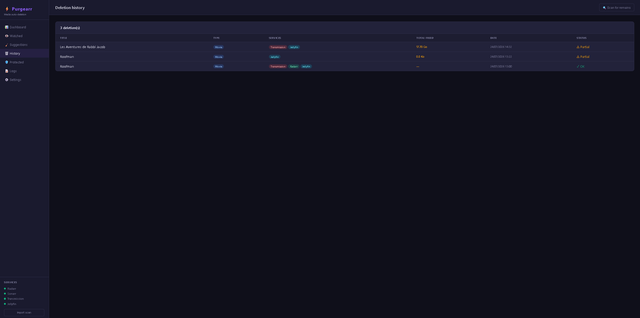
- History — all past deletions with a leftover copy scanner
- Event log — filterable journal of every operation, with category and level filters
- Settings — full configuration from the web UI, no file editing required
- Multi-user — define required watchers; deletion is only suggested when all have watched
- Multi-tracker — detects all torrents seeding the same file across multiple trackers, deduplicated for size calculation
- Hardlink detection — inode + SHA-256 scan before deletion to catch duplicate copies
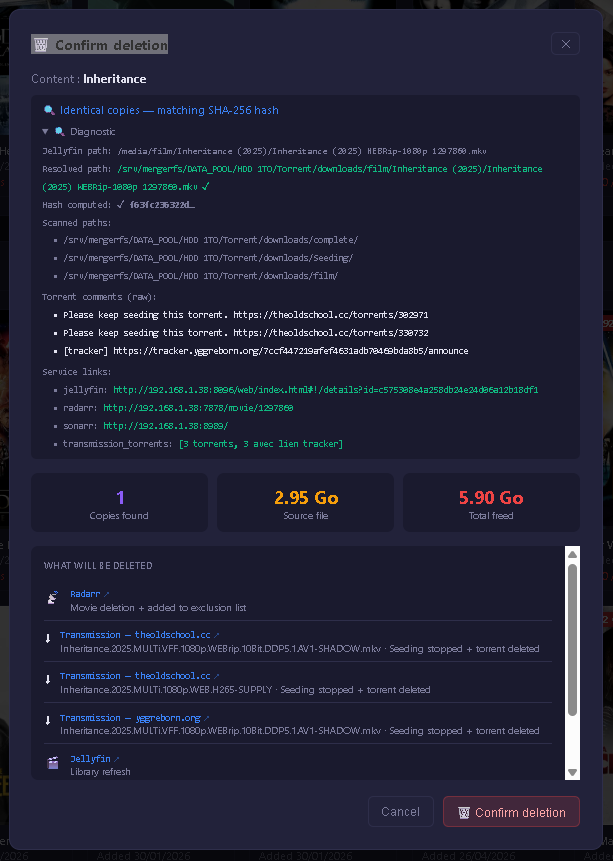
- Confirmation modal — shows exactly what will be removed before any deletion
- Language — 6 languages
| URL | Description |
|---|---|
/ |
Dashboard — stats, queue, recent history |
/watched |
Viewed content list |
/suggestions |
Never watched / dead torrents / partially watched |
/catalogue |
Full catalogue — search, sort, filter |
/protected |
Whitelist management |
/history |
Past deletions + leftover copy scanner |
/transmission |
Orphaned torrents + full torrent list |
/logs |
Event journal |
/settings |
Configuration |
| Component | Technology |
|---|---|
| Backend | FastAPI + Uvicorn |
| Database | SQLite via SQLAlchemy |
| Scheduler | APScheduler |
| Templates | Jinja2 |
| Frontend | Vanilla HTML / CSS / JS |
| i18n | Custom module — 6 languages |
- Python 3.10+
- Jellyfin, Radarr, Sonarr and Transmission accessible on your local network
1. Clone the repository
git clone https://github.com/Lekarov/Purgearr.git
cd Purgearr
2. Virtual environment + dependencies
python3 -m venv venv
source venv/bin/activate
pip install -r requirements.txt
3. Start
python main.pyThe interface is available at http://[IP]:7979. Configure all services from the Settings page on first launch.
4. The data/ folder — never delete
data/
├── config.json        ← configuration (URLs, API keys, rules)
├── protected.json     ← protected content whitelist
├── purgearr.db        ← history, queue, watch events
└── cache/             ← temporary cache (auto-regenerated)
This folder is excluded from git — your data is preserved across updates.
[Unit]
Description=Purgearr Media Manager
After=network.target

[Service]
Type=simple
WorkingDirectory=/path/to/Purgearr
ExecStart=/path/to/Purgearr/venv/bin/python main.py
Restart=on-failure
RestartSec=10

[Install]
WantedBy=multi-user.target
sudo systemctl enable purgearr
sudo systemctl start purgearrThe webhook receives PlaybackStop events from Jellyfin in real time. Install the Webhook plugin from the Jellyfin catalog:
- URL:
http://[IP]:7979/webhook/jellyfin - Event:
Playback Stop
Auto mode (automatic deletion on playback stop) is currently in stabilization — use manual deletion from the interface only.
git pull
sudo systemctl restart purgearrPurgearr runs entirely on your own machine — no data ever leaves your network.
- No analytics, no telemetry, no external services
- All API calls go directly to your local Jellyfin, Radarr, Sonarr, and Transmission instances
- Configuration is stored locally in
data/config.json
The source code is fully auditable — every line is in this repository.
MIT — use and adapt freely.