A modern, user-friendly desktop application for downloading videos and audio from YouTube using yt-dlp with a clean dark-themed interface.
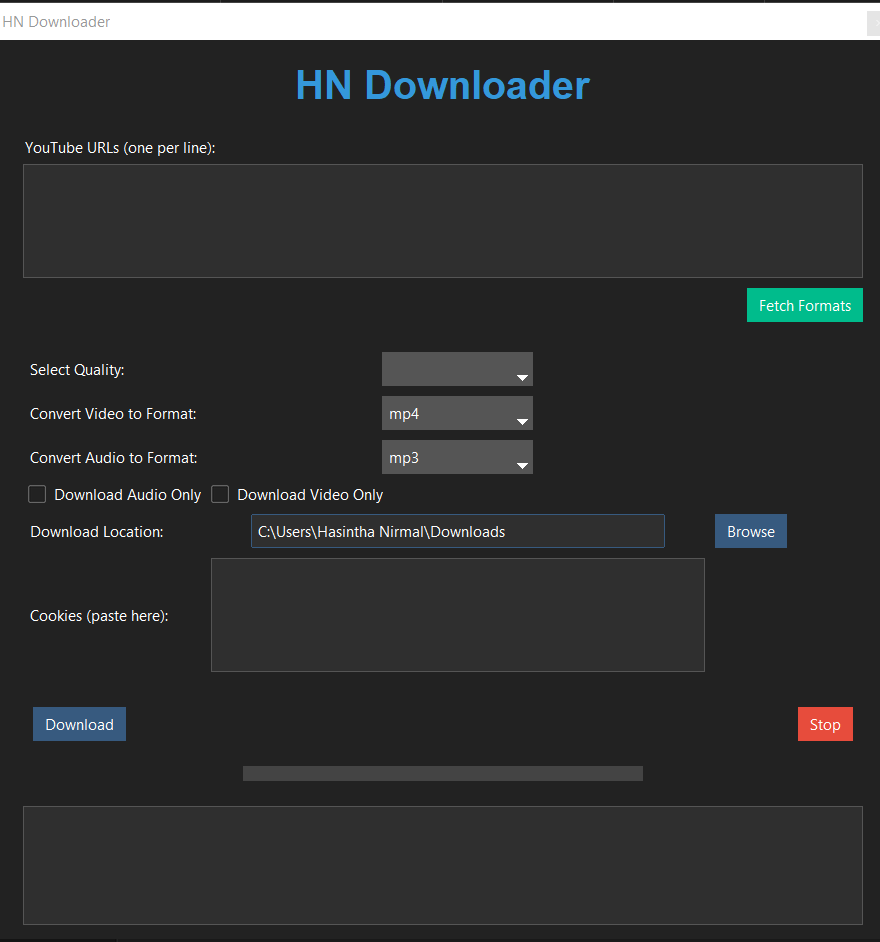
- Download videos in multiple formats (MP4, MKV, AVI)
- Extract audio in various formats (MP3, M4A, Opus)
- Batch download support (multiple URLs)
- Video quality selection
- Audio-only and video-only download options
- Custom download location
- Cookie support for private/restricted videos
- Progress tracking with visual progress bar
- Dark theme interface
- Format information fetching
- Download cancellation support
- Python 3.6+
- FFmpeg
- Required Python packages (installed automatically):
- ttkbootstrap
- yt-dlp
- ffmpeg-python
- Clone the repository:
git clone https://github.com/Hasintha-Nirmal/hn-downloader.git
cd hn-downloader- Run the setup script:
python setup.pyThe setup script will:
- Install required Python packages
- Set up yt-dlp
- Download and configure FFmpeg if not already installed
- Add FFmpeg to system PATH (Windows only)
Note: After installation on Windows, you may need to restart your terminal or command prompt for PATH changes to take effect.
- Launch the application:
python HNDL.py-
Enter YouTube URLs (one per line) in the text area.
-
Configure download options:
- Select video quality
- Choose output format for video/audio
- Toggle audio-only or video-only download
- Set download location
- Add cookies if needed for restricted content
-
Click "Fetch Formats" to see available format options for the URLs.
-
Click "Download" to start downloading.
-
Monitor progress in the log window and progress bar.
-
Use the "Stop" button to cancel ongoing downloads.
- URLs Input: Enter one or more YouTube URLs, each on a new line
- Quality Selection: Choose video quality (defaults to best available)
- Format Selection:
- Video formats: MP4, MKV, AVI
- Audio formats: MP3, M4A, Opus
- Download Options:
- Audio Only: Extract only audio from videos
- Video Only: Download video without audio
- Location: Choose where to save downloaded files
- Cookies: Paste cookies for accessing restricted content
- Controls:
- Fetch Formats: View available formats for URLs
- Download: Start downloading
- Stop: Cancel current download
- The application validates URLs before downloading
- Displays detailed error messages in the log window
- Handles network interruptions gracefully
- Prevents multiple simultaneous downloads
Feel free to submit issues, fork the repository, and create pull requests for any improvements.
- Built with yt-dlp
- UI powered by ttkbootstrap
- Uses FFmpeg for media processing
This tool is for personal use only. Respect YouTube's terms of service and content creators' rights when downloading videos.