Caution
I'm NOT hosting on any other site. The only official place to download NetanMastersYu is this repository.



The open source form mastery project that reaches for the red star.
- ProcessExplorer https://learn.microsoft.com/en-us/sysinternals/downloads/process-explorer (Safest program to open multiple roblox game clients)
- RDPWrapper (optional, for people who want to macro in the background while still wanting to use their PC)
- Download NetanMastersYu-v#.#.#.zip from the latest release (click here)
- Right click on the zip file and find the option to extract the file
- Open the extracted file and click on StartMacro.bat anytime you want to open the macro.
NOTE: Your anti-virus might produce a false positive, so it's best to mark the folder as an exception within your anti-virus beforehand.
Default hotkeys:
F1: Start the macro
F2: Stop the macro
J: Add form (saves the coordinates where your mouse cursor is)
U: Add slot (saves the coordinates where your mouse cursor is)
Before beginning, you should have your roblox alt logged in on a browser and your main on a different browser or on the roblox app itself
-
Open DBZ Final Stand: Remastered on your ALT account FIRST (the account that will be m1ing your main) and press Win + RightArrowKey to split your screen with your ALT account on the right handside.
-
Next, run process explorer as administrator and then type "roblox" in the top right search field and afterwards enable the Handles panel found near the top left (or enable it via CTRL + L)
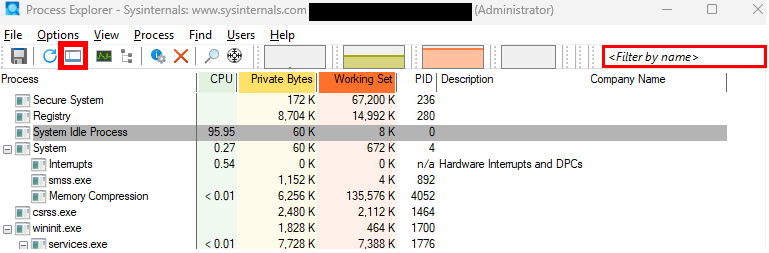
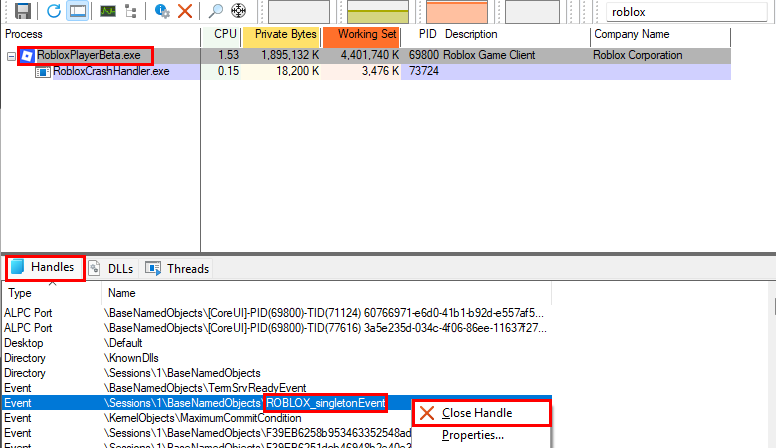
2.b) Click on RobloxPlayerBeta.exe and double check you're on the "Handles" section of the panel below. Then find the event that dislays "ROBLOX_singletonEvent" and right click on the even and click "Close Handle".
-
After closing the Singleton event, you should then launch your main account whilst keeping your ALT account open ingame, split screening it like your ALT's roblox window but this time positioning it to the left side of your screen. Once your main account is on the main menu of FSR, hover your cursor over the slot that you want to farm mastery on and press your binded "Add slot" hotkey (open the macro beforehand) Then click on the slot and find what server your ALT account belongs to.
-
With both accounts launched and in the same server, find a confined space where your ALT can reach your main with m1s but where your main cannot escape out of range. Ideally, one should just dig a hole in the ground and carve out a cube like area (recommended to dig with ki blasts and then crusher ball to create tiny spaces)
-
Once you have secured a hole or some other very confined space, go back to your alt roblox window and place it inside of the space and then hold down LMB (Left-mouse button) and whilst holding it down, press esc on your keyboard and your alt should continue to m1 without you having to hold down the mouse.
-
After your alt has been fully setup, go back to your main roblox window and then start the macro (ensuring your settings are properly configured on the macro beforehand) and enjoy farming form mastery ig.
Note: if you're not interested in farming mastery via an alt, and just want to transform/detransform loop, then read the section below.
Combat time only: Set Transformation Phase to "Before TP" | Have a user in the TP User field.
Combat zenkai: Set Transformation Phase to "After TP" | Have a user in the TP User field.
Transformation/detransformation loop only: Set Transformation Phase to "Before TP" | Blank out the TP User field
Q: How do I add forms/slots?
A: Hover your cursor where your form/slot is on roblox, and press your binded key related to it to save the coordinates of its position. For forms, you'll want to open up your transformation menu and when you see the form you want, move your mouse cursor to where it is and press your binded hotkey.
Q: How do I delete or rename forms/slots?
A: Right click on the form/slot that is selected in the rectangular field and the options will show.
Q: As a frieza, I remain in form after death, how will I be affected??
A: 💀🤞 Unfortunately, mastery will just be 2x slower for friezas since they'll need to detransform during the macro process. However, I'll try to find a workaround for this in the future (since I MAIN the race)
Q: How do I farm FSSJ mastery?
A: Just set your transformation key to "None" (whilst having your setting set to "After TP" and an alt to TP to)
Q: How do I get/use RDPWrapper?
A: Watch a tutorial online for a setup (I personally recommend this up to the 5:10 mark https://www.youtube.com/watch?v=4Oexj5zf84I&t=45s) and then afterwards, try to always update your rdpwrap.ini file from the issues tab of the official creators repository
ME, MYSELF AND I.
In all seriousness, I was inspired to start on this project due to being a longtime user of natro macro & a BSS fan; so when I came to FSR I wondered "what annoying thing exists that takes a longtime to do but is possible to automate?" and thus here we are...In fact, a lot of what you see on this webpage is inspired by the design of natro macro's repo. Although, can't quite say the same for the code though since I decided to start off with AHKv1 instead of AHKv2 💔
@FerdAngle
...also to [REDACTED]Worl for giving me enough time to decide on whether or not I wanted to make this 🙏