



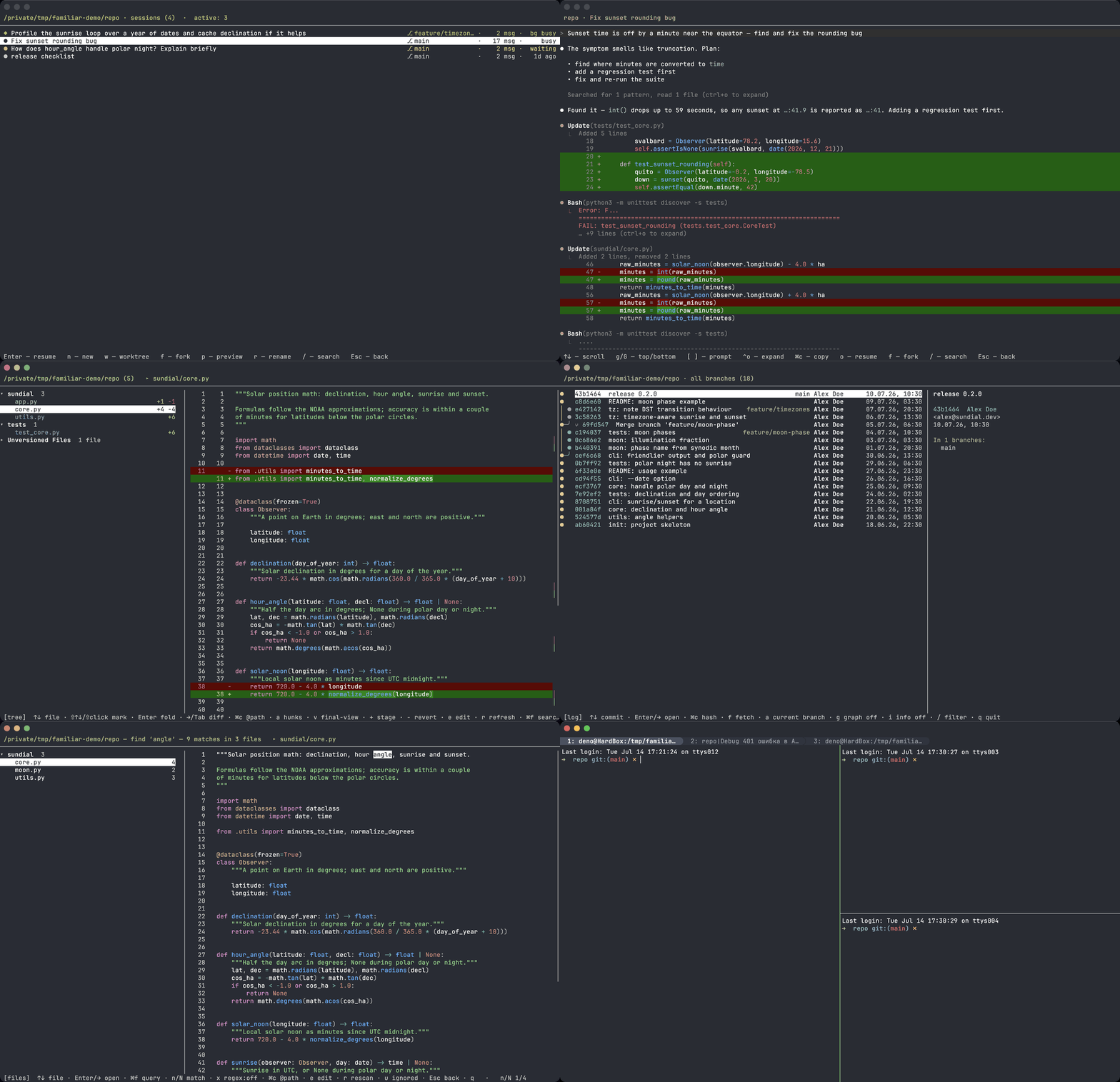
Claude Code writes the code in your terminal — familiar gives that terminal the missing IDE half. Three full-screen kitty overlays, one hotkey each: review everything the agent just changed in an IDE-grade diff, search any text across the project like an IDE's Find in Files, and send line comments straight back into the chat; see all your sessions live — which agent is busy, which is waiting for your permission — and resume, fork or spin up a worktree in a keystroke; walk the git history the same way. Pure Python standard library plus vendored Pygments for syntax highlighting — nothing to install. macOS only.
A familiar is a helper spirit in a cat's shape — fitting for a set of kitty kittens that tend your coding agents.
Each kitten is a full-screen overlay opened by a hotkey:
| Kitten | Hotkey | What it does |
|---|---|---|
| session | Cmd+Shift+S |
Browse and manage Claude Code sessions — resume, fork, continue, new session, git worktree, transcript preview with tool calls and their output, rename, and live activity (which sessions are running right now). |
| review | Cmd+Shift+R |
Two-pane reviewer for uncommitted git changes: file tree + syntax-highlighted unified diff, word-diff, go to definition (⌥-click), an IDE-style final-code view, search, jump-by-change, staging files from the tree, and line comments collected into markdown to paste back to Claude. Cmd+Shift+F inside the overlay — Find in Files mode: live git grep across the whole project with match navigation. |
| log | Cmd+Shift+L |
Git history browser: commit list with a branch graph and, per commit, the full review screen (comments, go-to-definition, Find in Files), git fetch / git push, and copying hashes / @path / @path#L42 to feed Claude Code. |
Full keymaps live in the per-kitten pages of the wiki.
No Claude Code? review and log don't need it — they work as plain git
overlays for any terminal workflow.
- macOS. Hotkeys are
Cmd-based,review's "open in editor" launches macOS IDE apps, and the bundled config uses macOS-only kitty options. On Linux/Windows you would remapCmd→Ctrl/Super. - kitty — tested on 0.47.
- git — required by
reviewandlog(they shell out togit). - Claude Code — required by
sessiononly; it reads~/.claude(honorsCLAUDE_CONFIG_DIR). - No external Python dependencies — the kittens run on kitty's bundled Python using only the standard library.
The familiar helper wires everything into kitty for you: it writes an
include into your kitty.conf and generates the kitten maps with absolute
paths (kitty resolves a relative kitten path from ~/.config/kitty, not from
the file that maps it — so the path can't just be relative). No manual editing,
no sed, and it survives updates.
brew tap denoby/familiar https://github.com/DenoBY/familiar
brew install denoby/familiar/familiar   # full name = trust just this formula
familiar enable --all                    # kittens + my terminal config
The full name denoby/familiar/familiar is required by Homebrew 6.0+ Tap Trust:
third-party taps aren't loaded until trusted, and a fully-qualified install trusts
only this formula. Alternatively trust the whole tap once with
brew trust denoby/familiar, then brew install familiar works bare.
Bleeding edge from master: brew install --HEAD denoby/familiar/familiar.
git clone https://github.com/DenoBY/familiar && cd familiar
./bin/familiar enable --all
Same command either way. Then reload the config — Cmd+Ctrl+, — or restart
kitty, and open with Cmd+Shift+S / Cmd+Shift+R / Cmd+Shift+L
(inside review, Cmd+Shift+F switches to Find in Files).
(Ctrl+Shift+F5 is kitty's Linux reload default; on macOS it's Cmd+Ctrl+,.)
Install modes — pick how much to wire in:
| Command | What it enables |
|---|---|
familiar enable --all |
all kittens + the terminal config (look, splits, tabs, Russian layout) — asks first, since it overrides your kitty settings |
familiar enable --kittens |
all kittens only, leaves your terminal config untouched |
familiar enable session review log |
only the named overlays (add --terminal for the terminal config too) |
familiar enable --terminal |
only the terminal config, no kittens |
familiar enable --all --theme darcula |
same as --all, but with the Darcula palette (JetBrains) instead of the default one |
familiar disable |
remove the familiar block (--restore reverts kitty.conf from the backup taken on first enable) |
familiar status |
show what's currently enabled |
Cyrillic key duplicates (S→ы, R→к, L→д) for the Russian layout are
generated automatically.
--theme darcula recolors both the terminal palette and the syntax highlighting
inside the kittens. Without --terminal/--all only the kittens are recolored —
familiar never touches your terminal look unless you ask for it. Colors come from
the official JetBrains scheme; --theme ghostty (the default) keeps the previous look.
To switch, run enable again with another --theme: the config is rewritten in full,
so nothing of the previous theme is left behind. Terminal and tab colors are picked up
by a config reload (Cmd+Ctrl+,), but the highlighting inside the kittens is driven by
FAMILIAR_THEME, which kitty hands to the kitten process on startup — that one needs a
kitty restart. familiar status shows what is active.
Writing your own theme: see the Themes wiki page.
familiar only ever adds a fenced block to your kitty.conf and writes a
familiar.conf beside it — nothing else is touched, so removal is clean:
familiar disable            # drop the familiar block + familiar.conf
familiar disable --restore  # ...and restore kitty.conf from the backup
On the first enable, familiar copies your kitty.conf once to
kitty.conf.familiar.bak (the pre-familiar state). --restore puts it back
byte-for-byte; the .bak stays afterwards, so you can restore later too.
familiar status shows where it lives.
Prefer to do it by hand? Delete the block between the
# >>> familiar >>> / # <<< familiar <<< markers in kitty.conf, remove
familiar.conf, or just copy kitty.conf.familiar.bak back over kitty.conf.
config/ is my full, working kitty configuration — the
Ghostty-flavoured look, splits and tabs, and the Russian-layout fixes. It's
optional: the kittens run on any kitty. If you want the whole setup, see the
config README.
The Homebrew build is for everyday use. To work on familiar, clone the repo and
point your config at the checkout, then restore the released build when you're
done — all on your working ~/.config/kitty:
brew install denoby/familiar/familiar
familiar enable --all          # everyday use — the released build

git clone https://github.com/DenoBY/familiar && cd familiar
./bin/familiar enable --all    # switch your live config to this checkout
# edit plugins/**, reload kitty (Cmd+Ctrl+,) to see your changes

familiar enable --all          # switch back to the Homebrew build
Both the Homebrew familiar and the repo ./bin/familiar write the same
~/.config/kitty/familiar.conf, so switching is just re-running the other one —
no duplication, nothing to clean up. familiar bakes absolute paths from wherever
it runs: the brew build points at /opt/homebrew/opt/familiar/libexec, the checkout at
your clone. familiar status prints wired root: — the installation kitty
actually runs — next to the app root: of the copy you invoked, and warns when
the two differ; familiar disable removes it entirely.
Standard-library unittest, no external dependencies, run outside kitty:
python3 -m unittest discover -s tests -t testsWhat's covered is in tests/README.md.
MIT — see LICENSE. © 2026 DenoBY.